
Instagram is a photo sharing app which allows users to assign filters to photos and share them with followers. Users follow each other in an asynchronous manner, like Twitter, and can comment, like, and tag each other in pictures. Instagram also has map check in and hashtag capability to allow users to search by topic.
Instagram is one of the fast-growing social media platforms with 800 million monthly active users, it’s fast becoming the go-to advertising space; especially for 18-30 year olds.
PURPOSE
In short, the purpose of Instagram is to make connections with people who see the world in interesting ways. You can find and follow people based on the kinds of images that inspire them, and if they like yours, they’ll follow you back. The simple mechanisms of liking and commenting provide great fun and feedback. It’s a new kind of network that’s perfect for the smartphone age. No wonder Facebook bought it.
PERSONALIZATION
Instagram relies on machine learning based on your past behavior to create a unique feed for everyone. Even if you follow the exact same accounts as someone else, you’ll get a personalized feed based on how you interact with those accounts.
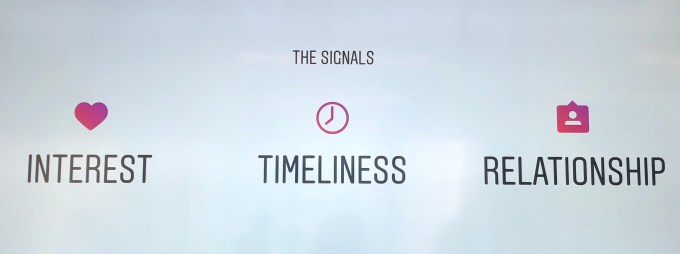
Three main factors determine what you see in your Instagram feed:
- Interest: How much Instagram predicts you’ll care about a post, with higher ranking for what matters to you, determined by past behavior on similar content and potentially machine vision analyzing the actual content of the post.
- Recency: How recently the post was shared, with prioritization for timely posts over weeks-old ones.
- Relationship: How close you are to the person who shared it, with higher ranking for people you’ve interacted with a lot in the past on Instagram, such as by commenting on their posts or being tagged together in photos.
Beyond those core factors, three additional signals that influence rankings are:
- Frequency: How often you open Instagram, as it will try to show you the best posts since your last visit.
- Following: If you follow a lot of people, Instagram will be picking from a wider breadth of authors so you might see less of any specific person.
- Usage: How long you spend on Instagram determines if you’re just seeing the best posts during short sessions, or it’s digging deeper into its catalog if you spend more total time browsing.
CONNECTIVITY
Connectivity Strategy h
elps brands develop sound strategy and tactical implementations that ensure trackable results across: digital, search, social & traditional media.TOOLS
Instagram has changed its stance on automated scheduling tools. So, below you’ll discover a bunch of scheduling tools that support direct publishing to Instagram, and some other great tools to boost your social media presence.1. Buffer for Instagram

Buffer is a wonderful time-saver when it comes to managing your social media accounts. It lets you publish and schedule upcoming posts on multiple social media platforms like Facebook, Twitter and Pinterest – and provide in-depth analytics on your social campaigns.
And now Buffer allows you to do exactly the same thing with Instagram. So you can now schedule posts to Instagram!
And now Buffer allows you to do exactly the same thing with Instagram. So you can now schedule posts to Instagram!
What’s particularly great about Buffer is just how simple it is to use – so you don’t have to worry about much of a learning curve. Hook up your social accounts, schedule your content and you’re good to go.
You can use Buffer for Instagram for free for up to 10 scheduled posts. If you want more posting options, you can sign up for their Awesome plan for as little as $10/month for 10 social profiles and 100 scheduled posts.
2. Hootsuite
Hootsuite* is similar to Buffer in that it allows you to publish directly to Instagram. But, this popular social media tool goes far beyond simply scheduling your posts.
Let’s look at a few other ways you can use Hootsuite:
1) Look at your competition
If you’re new to Instagram, one thing you can do is start following bloggers in your niche and those you admire and look up to.
By following your “competition,” you can gain insight into their marketing strategy. How many followers do they have and will it be realistic for you to achieve the same?
What types of posts does your competition publish? Is their Instagram feed full of personal posts of themselves or behind-the-scenes images of their business?
You can also see how engaging their posts are and how they are using hashtags to reach more people.
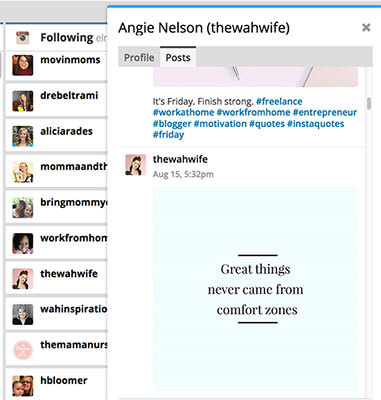
Hootsuite can help you monitor your competition easily, right on your dashboard.
2) Grow your engagement on Instagram
Growing your brand and presence on Instagram relies on how well you engage on this platform. It isn’t just all images and hashtags.
Hootsuite’s search streams make it easy to work on building a community of followers.
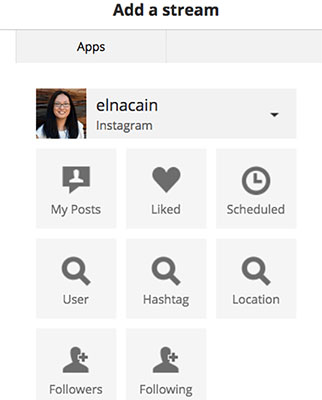
For example, if you create a branded hashtag like #myblogname or #myphrase, you can set up a hashtag search stream and easily see who is using your branded hashtag and like and comment on their posts.
If you want to find and follow influencers in your niche, you can set up user search streams for their profiles.
Hootsuite offers a free 30-day trial for 3 social profiles and paid options start for as little as $9/month for 10 social profiles, all the way up to $99/month for 50 social profiles.
3) Sendible
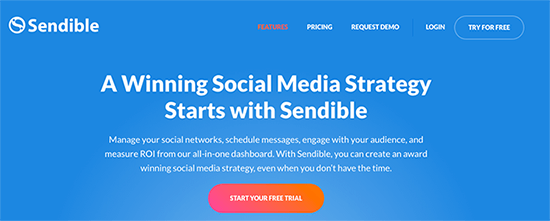
Sendible* is a complete social media management tool so it goes far beyond simply allowing you to schedule & publish content directly to Instagram (and other social networks).
It’s a fully fledged Instagram management tool.
You can use Sendible to schedule updates, reply to your followers via a social media inbox, create analytics reports, or collaborate with your team.
You can use Sendible to schedule updates, reply to your followers via a social media inbox, create analytics reports, or collaborate with your team.
And it’s a great solution for agencies too.
Want to schedule Instagram posts while you’re on the go? No problem. Sendible have a mobile app for that.
Just open the Compose box, select which Instagram account you want to post to, write your message, and then select the time you want to publish the post.
4) Later.com
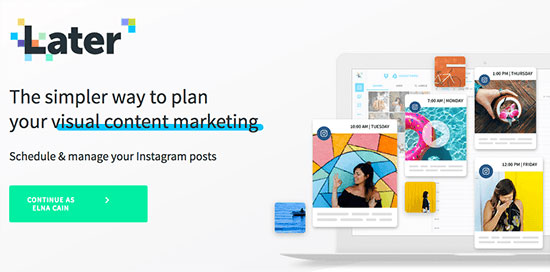
Later is another powerful scheduling tool for Instagram.
Later boasts that they are used by,”600,000 of the world’s top brands, agencies and influencers,” making it a very popular tool used by many bloggers, small businesses and entrepreneurs.
And they also provide an easy way of managing your comments on Instagram.
They offer a $0, Free Forever plan that lets you schedule up to 30 photo posts (no video) for one social profile per month. Paid options start at $9/month going all the way up to $49/month for unlimited posts for up to 5 social profiles.
5) Tailwind
Tailwind* is mostly known as an automated scheduling and analytics app for Pinterest, but they recently expanded their feature set to include Instagram scheduling.
With these new updates, Tailwind makes it easy to bulk schedule your Instagram posts using their drag-and-drop functionality.
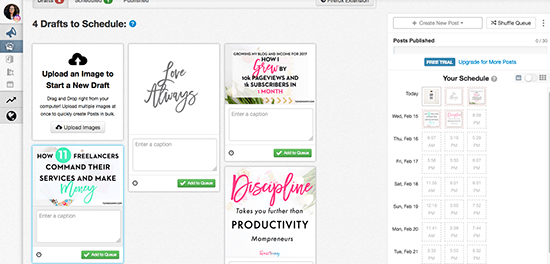
One thing Tailwind’s Instagram scheduler has over other competing apps is their unique Smart Schedule functionality. Tailwind automatically recommends the optimal times to post, uniquely tailored to your Instagram account. This means posts are scheduled to go live when your audience is the most engaged and most likely to interact with your content.
And, just like Tailwind is an official Pinterest partner, they are also partnered with Instagram. This means you can feel confident your account will remain in good standing as they abide by Instagram’s Terms of Service.
Tailwind for Instagram Plus Plan is available for $15/month. If you already have a Plus Plan with Tailwind – most likely you do if you use their Pinterest functionality – you can trial the Instagram scheduler for free for up to 30 posts.
Okay, that’s it for the scheduling, management & analytics tools. Now, let’s take a look at other types of Instagram tools that you could find useful.
6) Hashtagify.me
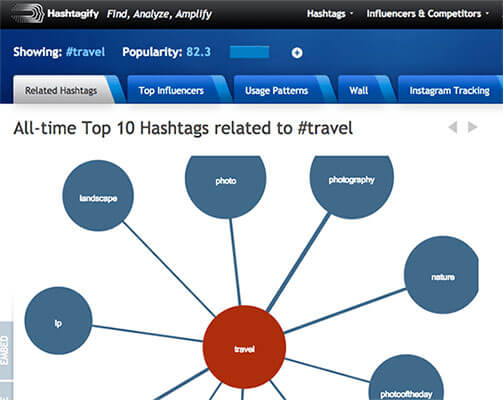
While Hashtagify is more focused on Twitter hashtags, that doesn’t mean you can’t use their data to gain an advantage on Instagram.
Hashtags are hashtags, and what’s trending on one platform can easily be trending on another. Remember, your competitors might not be looking here too, so that’s another bonus.
Start by searching for your niche, blogging for example – it’s free. You’ll then be presented with a tag cloud, and each item is clickable, letting you go deeper into your niche to gather popular tags.
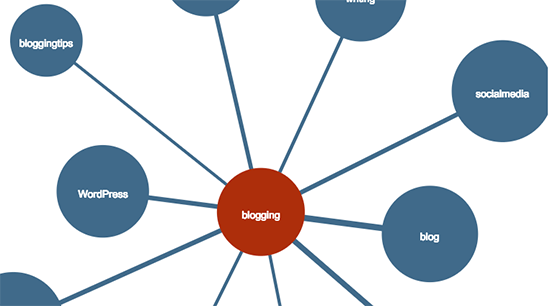
If you’re into numbers rather than visual representations, Table Mode supplies you with the data on how popular each hashtag is, the correlation between your search, and their weekly and monthly trend.
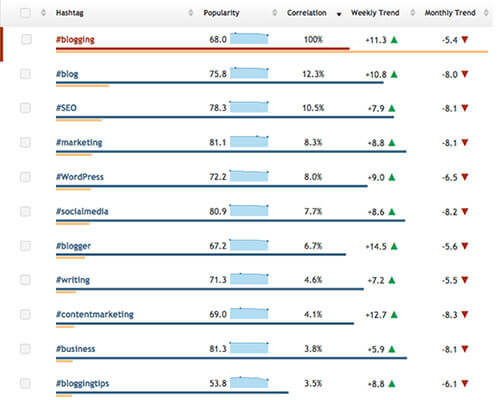
Hashtagify also offers Instagram tracking and helps you find the top related hashtags and influencers in your niche. There’s a 10-day free trial and if you want to upgrade, it’s $59/month for access to the hashtag library and labs, and tracking for Instagram.
7) Iconosquare
Iconosquare gives you insights into your Instagram account and allows you to manage your Instagram activity.
If you really want to use Instagram as a marketing strategy for your blog or business, then Iconosquare can give you deep analytics into your account or accounts.
It measures follower growth, location, daily follower gain/loss, unfollows, and much more.
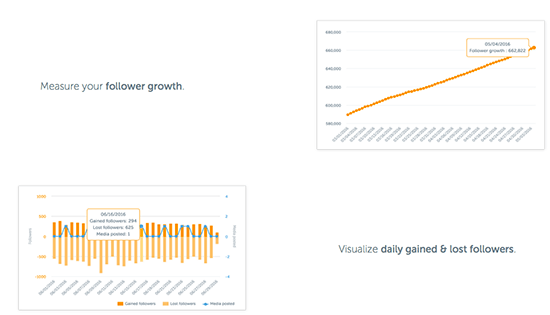
On top of that, you can see how your posts are performing by tracking comments and likes – as well as hashtags – to see how successful your posts are at engaging your followers and attracting new followers.
If you’re stuck trying to find the best hashtags for your post, Iconosquare’s got your back. You can use their service to search for hashtags as well as users so that your posts can reach more people.
And if you’re stuck with marketing tactics, Iconosquare can help you run Instagram contests.
Prices start at $9/month (per Instagram account) for the Plus package, which excludes hashtag and competitor tracking, and goes up to $990/year for the Corporate package which can track up to 5 hashtags and 7 competitors – with data export and the ability to run contests available.
ETIQUETTE
Have you read the Instagram terms of use? They aren’t exactly fun light reading, but it turns out that Instagram has some pretty strict rules about certain things.
If you break these rules, you can get shadowbanned or have your account suspended. So, let’s take a look at what these Instagram rules actually are.
1. Use a trusted third party posting app
Instagram used to have a completely closed API– it didn’t allow third party apps to post directly to Instagram at all. As of 2018, you can now use an official Instagram partner like Agorapulse to manage your Instagram business profile and schedule, queue and publish directly.
While you can now publish directly to business profiles following these steps, there are still some notable restrictions in the T&Cs. Be aware, there are some apps that ignore these and use methods of publishing not approved by Instagram. This is a big Terms and Conditions no no. Use a certified Instagram partner like Agorapulse and keep your profile safe!
2. Don’t use banned hashtags
Not all hashtags are created equal. Using one of Instagram’s banned hashtags can land you in hot water and ignorance is not an excuse.
While some banned hashtags are pretty common sense and align with Instagram’s terms of service, others aren’t so obvious. According to the HuffPo, the banned list includes #adulting, #citycentre and #eggplant. Research the hashtags you use carefully, make sure that they are relevant for your audience and don’t have a secret, urban dictionary or emoji meaning you didn’t know about… (Not that this has ever happened to me!)
How do you check if a hashtag is banned? Simple. Just type it into the search box.
If you get the “No results found” page then the hashtag is banned and you are best off staying away from it.
3. Don’t post too much
Instagram favors real, human posters and all the dos and don’ts are meant to prioritize them over spammers and bots.
While Instagram hasn’t released official numbers, Ana Gotter did some in depth research and came up with the following limitations:
- Following and unfollowing over 60 people an hour
- Liking more than 300 posts an hour
- Posting over 60 comments an hour
As long as you use your account normally and don’t pass off the responsibility to a robot butler you should be fine. Speaking of robot butlers…
4. Stay away from the robots
Look. In any other circumstances, I’ll be the first to point out the potential of bots in automating your marketing process but that’s not what Instagram is all about.
Bots that auto comment and follow/ unfollow people can be a tempting way to grow your account. You’ll be the kind of person that uses them responsibly, right? But, going back to Rule 3, this kind of behavior will get you noticed for all the wrong reasons. Keep your interactions human.
5. Reposting comes with its own rules
Retweeting or sharing a post on Facebook is pretty easy. Add your own insights, hit that share button and users can see who the original poster was. Instagram makes it a bit harder. As a result, a lot of us aren’t sure what the rules and etiquette surrounding reposting are.
It’s pretty simple. Make sure you’ve got permission from the original poster and attribute the content to them. When you post the photo include the hashtag #regram or #repost and tag the original content owner. Now you can repost UGC without breaking the rules!
Beefeater does a pretty good job of re-sharing a user generated photo while sticking to the rules.
6. Don’t run illegal contests
Running an Instagram promotion or contest is a great way to get new followers, engage your existing followers and promote your brand. But, before you jump in, make sure you are playing by the rules.
You are fully responsible for the way the contest is run and for compliance with any government rules in your area as well as regulations related to any prizes you give away. So, if you make craft beer and you are running an exclusive contest, it’s up to you to make sure all contestants are of legal drinking age and that the contest doesn’t break any rules. Instagram squarely puts all the responsibility at your doorstep.
The not quite rules
Ok. So we spoke about some of the actual rules that can get you shadowbanned or worse. But, like with all social media platforms (and generally just with any social interaction) there are the other kind of rules. Breaking those rules will decrease your effectiveness on Instagram and lead to a drop in engagement rates.
No one wants that. So, here are some of those other rules worth staying on the right side of.
- Don’t ignore the comments: If someone’s taken the time to interact with you, engage with them! Otherwise this won’t turn into much of a two-way relationship.
- Come up with a posting schedule: If your Instagram account is just for friends and family, you don’t need an official schedule. But, if you are using it to grow your brand and business, you need a solid posting plan to maximize ROI.
- Create a theme for your posts: This makes it easier to post regularly because you know what’s coming next. It also builds a branded look for your account.
- Be human: Instagram’s best practices really come down to how a real person is likely to interact with an account versus how a bot/spammer/troll would. Using your common sense will get you a long way!
Conclusion
It's important to identify and analyze your overarching digital plan and determine whether or not Instagram is a good fit for your audience. From there, it's time to plan.
These tips and tricks will help you in the planning stages, but constantly push yourself to be innovative and think different.
Aspire to create compelling content and refuse to accept the belief that what others have done in the past must be replicated.
Strive to create your own path and use Instagram to visually engage and connect with your audience.


Comments
Post a Comment